Website speed is one of Google’s confirmed search ranking factors that directly dictates user experience, search positions, and digital revenue. In 2026, modern internet users abandon sites that take more than 2.5 seconds to render.
This guide publishes the 2026 price ranges for professional speed work, the standards those quotes are measured against, and the return you should expect from the spend.
Direct Answer (AEO Quick Answer):
Website speed optimization services in 2026 cost between $300 and $2,500 USD. Standard WordPress sites average $300 to $650, active WooCommerce and e-commerce stores range from $750 to $1,600, and custom React/Next.js web applications range between $900 and $2,500. Comprehensive performance audits cost $200 to $450. By satisfying Google Core Web Vitals (LCP under 2.5s, INP under 200ms, and CLS under 0.1), speed optimization yields an average conversion lift of 15% to 25% with full ROI achieved within 60 days.
1. Speed Optimization Pricing Benchmarks (2026)
Website speed optimization in 2026 costs between $300 and $2,500 USD depending on platform and scope: standard WordPress sites run $300 to $650, e-commerce builds $750 to $1,600, and custom React or Next.js applications $900 to $2,500, with standalone audits at $200 to $450.
| Website Category | Architecture | Key Deliverables | Typical Price (USD) | Timeline |
|---|---|---|---|---|
| Corporate / Portfolio | WordPress / Static | Edge caching, WebP/AVIF conversion, CSS/JS purge, render-blocking removal | $300 – $650 | 2–4 Days |
| E-Commerce Store | WooCommerce / Shopify | Redis object caching, database transient cleanup, query fix, dynamic cart tuning | $750 – $1,600 | 4–7 Days |
| Custom Web Application | Next.js / React / Node | Bundle splitting, SSR/SSG tuning, Cloudflare Edge rules, tree-shaking, font preload | $900 – $2,500 | 5–10 Days |
| Comprehensive Speed Audit | All Platforms | Lighthouse deep-dive, server TTFB profiling, JS flame charts, actionable remediation plan | $200 – $450 | 1–2 Days |
What each tier actually includes. The corporate range covers edge caching, image conversion, and removing render-blocking assets — work that touches templates and the CDN, not your data. The e-commerce range adds database work: object caching, transient cleanup, query fixes, and dynamic cart behavior, which is why it sits higher. The custom-application range prices bundle splitting, rendering strategy, and edge rules across a codebase your own team owns. Audits are priced separately so you can see the scope before committing to the remediation itself.
You can optimize your page presentation by checking title lengths in our SEO Title Checker and testing structured data in our Schema Generator.
2. What Moves Your Quote Up or Down
Your final quote moves with four things: how much legacy bloat the site already carries, how complex the database and checkout logic are, whether the current host can serve cached content properly, and how many third-party scripts are embedded in templates. Cleaning up before optimizing usually costs less than optimizing around the mess.
- Legacy plugin and theme weight. A site carrying years of abandoned plugins pays for their removal first; dead code still ships to visitors until someone deletes it.
- Database size and query health. Large catalogues, unbounded postmeta growth, and slow queries push work into the e-commerce or custom tier regardless of the front end.
- Hosting tier. A server that cannot serve cached pages properly caps what any frontend optimization can achieve, and the fix is a migration, not a plugin.
- Third-party embeds. Chat widgets, A/B tools, and review widgets load on every page and are rarely inside your provider’s default scope.
- Scope of the redesign. If templates must be rebuilt to remove unsized images and blocking styles, you are buying front-end work as well as tuning.
- Whether you start with an audit. The $200 to $450 audit is the cheap way to discover your site needs the $650 tier rather than the $2,500 one.
3. Google Core Web Vitals 2026 Standards
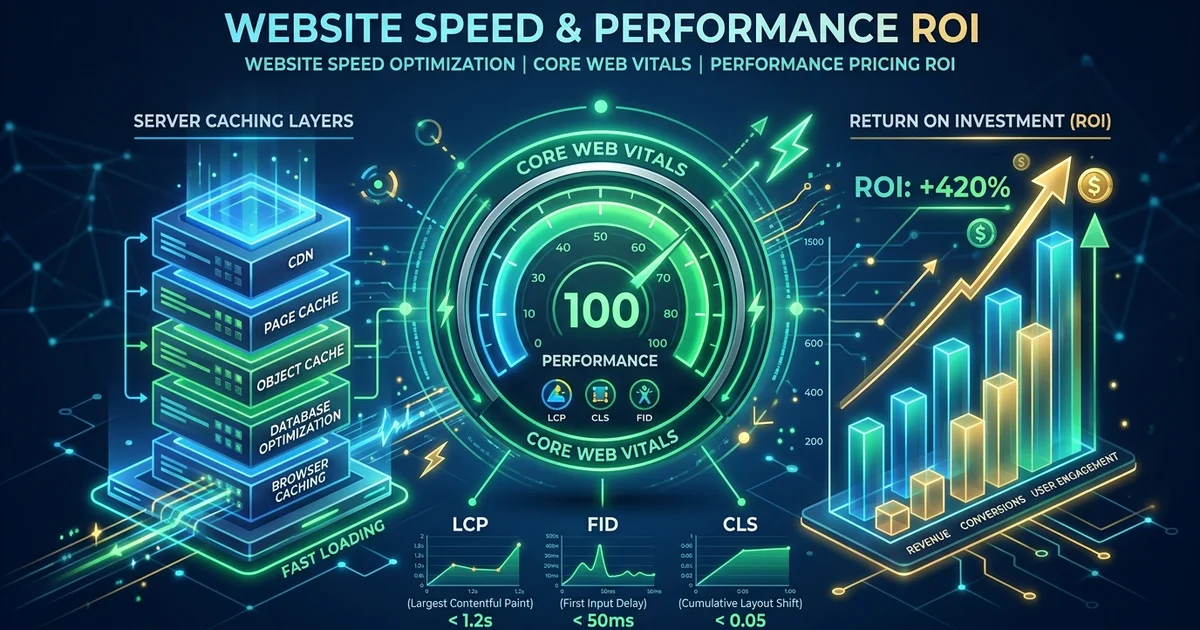
Google’s 2026 Core Web Vitals are Interaction to Next Paint, Largest Contentful Paint, and Cumulative Layout Shift, scored from Chrome User Experience Report field data. The headline change is the retirement of First Input Delay in favor of INP, which measures the latency of every tap, click, and key press per visit rather than only the first one:
┌─────────────────────────────────────────────────────────────────────────┐
│                    2026 Core Web Vitals Thresholds                      │
├─────────────────────────┬───────────────────┬───────────────────────────┤
│ Metric                  │ Good Threshold    │ What It Measures          │
├─────────────────────────┼───────────────────┼───────────────────────────┤
│ INP (Interaction to     │ < 200 ms          │ Latency of all user taps, │
│ Next Paint)             │ (Ideal < 100 ms)  │ clicks, and key presses   │
│                         │                   │ throughout the visit      │
├─────────────────────────┼───────────────────┼───────────────────────────┤
│ LCP (Largest Contentful │ < 2.5 seconds     │ Render duration of main   │
│ Paint)                  │ (Ideal < 1.8 s)   │ viewport image or heading │
├─────────────────────────┼───────────────────┼───────────────────────────┤
│ CLS (Cumulative Layout  │ < 0.1             │ Visual unexpected shifts  │
│ Shift)                  │ (Ideal < 0.05)    │ and button jumping        │
├─────────────────────────┼───────────────────┼───────────────────────────┤
│ TTFB (Time to First     │ < 800 ms          │ Server response time to   │
│ Byte)                   │ (Ideal < 200 ms)  │ browser initial request   │
└─────────────────────────┴───────────────────┴───────────────────────────┘
Failing any of these thresholds in Chrome User Experience Report (CrUX) data directly harms your mobile rankings and reduces Google AI Overview extraction likelihood.
Each failing metric also tells your provider which line of the quote you are paying for. INP failures usually trace to JavaScript work on the main thread, so the fix lands in script deferral and bundle work. LCP failures usually trace to hero images and slow server response, so the fix lands in asset delivery and caching. CLS failures are layout work: reserved dimensions for media, ads, and injected banners. When a quote cannot map its price to one of these three, the scope is not defined yet.
4. Technical Scope of Enterprise Speed Tuning
Professional speed work covers four layers at once: asset modernization, JavaScript and CSS optimization, database and backend refinement, and network edge delivery. A caching plugin touches part of one layer only, which is why plugin-only tuning stalls well short of the thresholds Google scores you on:
┌─────────────────────────────────────────────────────────┐
│              The 4 Pillars of Real Speed Tuning         │
├─────────────────────────┬───────────────────────────────┤
│ 1. Asset Modernization  │ Lossless WebP/AVIF compression│
│                         │ and responsive image srcset   │
├─────────────────────────┼───────────────────────────────┤
│ 2. JavaScript & CSS     │ Code-splitting, critical CSS  │
│    Optimization         │ inlining, deferring 3rd party │
├─────────────────────────┼───────────────────────────────┤
│ 3. Database & Backend   │ Query indexing, transient     │
│    Refinement           │ cleanup, reducing TTFB < 200ms│
├─────────────────────────┼───────────────────────────────┤
│ 4. Network Edge Delivery│ HTTP/3, Brotli compression,   │
│                         │ Cloudflare Edge rules         │
└─────────────────────────┴───────────────────────────────┘
1. Asset modernization. Convert originals to modern formats at the CDN or build step, serve responsive sizes per breakpoint, reserve dimensions so nothing reflows, and let the largest viewport element load with priority while the rest waits.
2. JavaScript and CSS optimization. Split bundles by route, inline the styles needed for first paint, drop dead rules, and defer everything third-party until after the page is usable. Most recurring regressions enter through tag managers here.
3. Database and backend refinement. Clean transient and autoloaded data, index the queries that repeat, and remove slow plugins from the request path. This is the tier plugin-only fixes never reach, and it is why dynamic stores price higher.
4. Network edge delivery. Serve over HTTP/3 with Brotli compression, set explicit cache rules at the edge, and route visitors to the nearest point of presence so distance stops dominating the response time.
5. The Proven ROI of Website Performance
Speed work returns money because conversion moves with load time: the studies cited here show an 8.4% retail conversion gain per 0.1-second improvement, cart abandonment falling up to 18% when LCP drops under 2.0 seconds, and crawl budget expanding up to 300% with faster server response.
Extensive studies by Google, Walmart, and Deloitte demonstrate that:
- Every 0.1-second speed improvement increases retail conversion rates by 8.4%.
- Lowering LCP below 2.0 seconds cuts cart abandonment by up to 18%.
- Faster server response expands search engine crawl budget by up to 300%, indexing new content significantly faster.
Real-World ROI Calculation:
Consider an e-commerce store generating $20,000 in monthly revenue with an average conversion rate of 1.8%:
- Speed optimization reduces page load time from 4.8s to 1.6s, driving a conservative 15% conversion lift.
- Incremental Monthly Revenue: $3,000 USD.
- A $1,200 speed optimization investment achieves 100% payback in under 14 days, delivering compounding pure profit every month thereafter.
The calculation is deliberately conservative on its assumptions: it uses the lower end of the published conversion-lift range and prices the engagement at the mid-tier rate from section one. Before you sign anything, sanity-check the same arithmetic against your own analytics — monthly revenue, current conversion rate, and the share of traffic that reaches the checkout or contact form — so the ROI claim rests on your numbers rather than a model. For a field-data reference point, our Qazvin retail platform work holds 98/100 PageSpeed across 300+ shops — see web design in Qazvin.
6. When Do You Need a Professional Speed Optimization?
Hire a professional when the failure shows up in field data or in your own users, not when a lab score dips below a round number. A cosmetic fix will not touch a systemic bottleneck, so the four signals below are the ones that justify paying for an engagement rather than a staging-copy cleanup:
- Your Google PageSpeed Insights mobile score is below 75.
- Search Console reports “LCP issue: longer than 2.5s” or “INP issue: longer than 200ms”.
- Mobile visitors report lag during checkout or navigation.
- Server resources spike to 100% CPU during traffic peaks.
If none of those apply and the site simply needs tidying, run the hands-on procedure in our website speed optimization guide first — much of the corporate-tier scope is work an owner can complete on a staging copy. Buy the engagement when the diagnosis points past the template layer, at the database, the bundle, or the edge.
Explore our dedicated Website Speed Optimization Services for immediate remediation.
7. How to Compare Speed Optimization Quotes
Compare quotes on scope, not headline price. Ask each provider for the specific fixes included, the baseline they will measure against, what falls outside the engagement, and what happens to the gains after the site publishes new content. A cheaper quote that omits database work or field-data verification is not cheaper.
- Ask for the baseline. A provider who has not measured your pages before quoting is guessing at the tier you need.
- Require a line-item scope. It should map onto the four pillars: assets, scripts, database, edge. Missing pillars mean missing work.
- Clarify what is excluded. Redesigns, plugin development, and hosting migrations are the three exclusions that turn a fixed quote into a change order.
- Confirm how results are verified. Gains should be re-measured on the same pages, in field data, after the work ships — not declared from a single lab screenshot.
- Ask who owns regressions. Publishing new content reintroduces weight; find out whether a follow-up pass inside the engagement window is included.
- Check the access you must grant. Server, CDN, and tag manager access are prerequisites. A quote that assumes none of them will stall on day one.
- Price the ongoing cost. Quarterly audits are how gains hold; ask for that rate up front rather than renegotiating after the first decay.
8. Conclusion
Budget for speed the way you budget for any work that compounds: pay for the fixes that remove the bottleneck, hold the line with clean publishing habits, and re-measure on a schedule. For most sites that means one focused engagement followed by lightweight quarterly audits, not a permanent retainer.
Optimizing website speed is the most immediate way to increase online revenue without spending an extra dollar on paid advertisements.
Contact WebABC today for a free performance audit and tailored quotation.