Choosing between WordPress CMS and Custom Web Development is an architectural decision, not a style preference. The two stacks fail differently. WordPress accumulates plugins, themes, and update debt until the site slows down or stops receiving patches. Custom code accumulates none of that, but every change and every security fix still needs a developer.
This guide compares them on the four dimensions engineering teams are measured on — performance, security, maintainability, and scale — then closes with a decision framework you can score your own project against. The budget and timeline side of the same choice lives in our business guide to WordPress vs Custom Development.
1. Architectural Comparison at a Glance
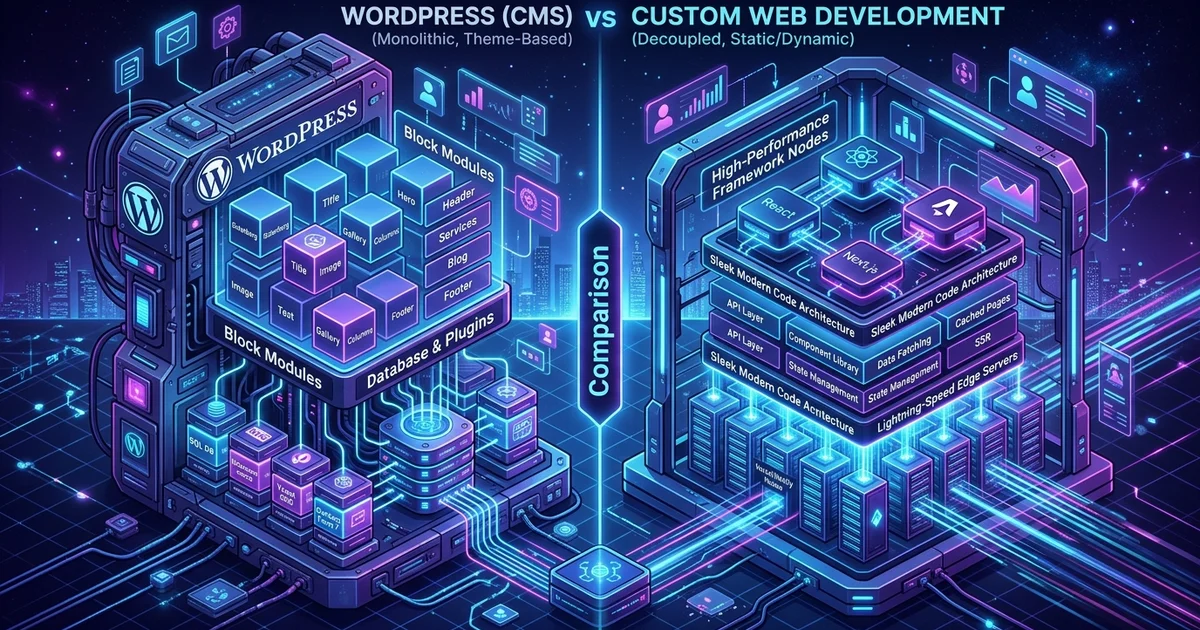
WordPress is a monolithic CMS that renders each request through PHP, plugins, and a database, while custom development pre-renders pages and serves them statically or from the edge. That difference in the rendering path drives most of the gaps in speed, security, and scaling shown below.
Rendering explains the speed rows. A custom stack delivers HTML generated at build time or cached at the edge, so the browser paints without waiting on a query. WordPress assembles a response on every uncached request. Dependency ownership explains the rest. WordPress functionality arrives as third-party plugins that you install, update, and occasionally rip out when the author moves on. Custom functionality is code your own team wrote, reviewed, and can refactor without waiting on a stranger’s release schedule.
| Comparison Factor | WordPress (Monolithic CMS) | Custom Development (Astro / Next.js / React) | Best for Scaling Brands |
|---|---|---|---|
| Speed & Core Web Vitals | Moderate (Requires caching & minification) | Blazing Fast (100/100 Core Web Vitals) | 🏆 Custom Development |
| Security & Vulnerabilities | Frequent plugin vulnerabilities | Hardened (Static/Decoupled APIs) | 🏆 Custom Development |
| Launch Timeline | Rapid (1–3 Weeks) | Moderate (3–6 Weeks) | 🏆 WordPress |
| Editorial Flexibility | Traditional, ubiquitous dashboard | Tailored, modern Headless CMS | 🏆 Tie |
| High-Traffic Scalability | Requires heavy database caching servers | Globally distributed on Edge CDNs for pennies | 🏆 Custom Development |
| Initial Upfront Cost | Budget-friendly | Higher upfront engineering investment | 🏆 WordPress |
| Rendering Path | Per-request PHP through plugin hooks | Pre-rendered HTML from build or edge | 🏆 Custom Development |
| Dependency Model | Third-party plugins you must vet and patch | Version-controlled first-party code | 🏆 Custom Development |
2. Performance: Rendering Path, TTFB, and Core Web Vitals
Custom stacks ship pre-rendered HTML, so the browser paints without waiting on PHP or a database query. WordPress renders per request on the server, and its time to first byte depends on plugin hooks, theme code, and database health. Caching narrows that gap; it does not close it.
On a custom stack the critical path stays short: HTML arrives, one small stylesheet runs, and the largest element on the page paints. On WordPress the same path crosses theme templates, plugin hooks, and a stack of stylesheets and scripts that each plugin considers its own priority.
Caching plugins flatten much of this, but they bring failure modes with them: a cache that clears itself after every publish, personalized content served stale, and configuration that silently stops working after an unrelated plugin updates. A custom build also lets you tune at the millisecond level — preload the fonts you actually use, defer everything below the fold, and ship one image pipeline instead of four.
The honest caveat belongs in this section too: a poorly built React single-page app can be slower than a well-tuned WordPress site. Architecture sets the ceiling. Implementation decides where you land under it.
3. Security: Attack Surface and Patch Ownership
The security difference is not WordPress core, which is patched quickly and reviewed by a large contributor base. It is the surface area: third-party plugins, nulled themes, and shared hosting misconfiguration. Custom stacks ship a smaller, auditable surface, but every vulnerability in it becomes your team’s patch to write.
Who applies patches, and how fast? WordPress core is maintained actively, so the practical risk sits in plugins and themes that update on their own schedule or never update again. On a custom project, patch cadence is your responsibility, including the framework and every package in the lockfile.
What is exposed at the edge? A WordPress site exposes a login endpoint, an admin dashboard, and a database behind PHP; hardening means limiting all three. A custom site usually exposes only the routes the application needs, with authentication handled by an API you control.
Who can break production? Auto-updating plugins and nulled themes are how most WordPress installs get compromised. The discipline that prevents it — staging, tested updates, a minimal plugin list — is the same discipline custom projects need for their dependencies.
4. Maintainability: What Long-Term Ownership Costs
Maintainability shows up as the cost of a change. In WordPress, adding a feature means finding a plugin, hoping it is still maintained, and accepting its code on every page. In a custom codebase, changes move through version control and review, but they queue behind developer availability.
Editorial work mirrors the trade-off. WordPress lets non-technical staff publish, preview, and schedule without filing a ticket. A custom site needs a headless CMS — Sanity, Strapi, or a markdown workflow — to give writers the same interface, which is the practical answer to whether non-technical staff can manage a custom site: yes, when the CMS is chosen deliberately instead of assumed.
Two failure modes end the same way. The frozen WordPress site: five years of plugins nobody will click update on, a theme only one contractor understands, and a redesign that becomes inevitable. The custom site with a bus factor: an undocumented codebase only its original author can safely modify. Both are prevented by the same habits — few dependencies, a documented deployment, and upgrades tested in staging first.
5. Scaling: Traffic, Data, and Integrations
Pre-rendered pages scale horizontally because serving them needs no database work; a traffic spike costs edge bandwidth instead of database connections. WordPress scales too, but every uncached hit runs PHP and a query, so scaling becomes a hosting problem solved with object cache, read replicas, and larger servers.
Integration is the second axis. Wiring WordPress to an ERP or CRM usually means middleware, webhooks, or licensed plugins that need their own maintenance. A custom web layer talks to those systems directly, with authentication, retries, and rate limits your code owns.
Watch the trade-off static generation introduces: work moves to build time. A site with thousands of frequently updated pages needs incremental builds or server rendering to keep publishes fast, otherwise the build pipeline becomes the new bottleneck you measure.
6. When WordPress Is the Better Architecture
WordPress wins when the workload is editorial and the requirements are conventional. Its plugin ecosystem converts months of engineering into settings screens, and the team that runs the site daily gets an interface they already know how to use, without an onboarding step or a deploy pipeline in the way.
- You are building a content-heavy publication or corporate site: where editors need author roles, previews, scheduling, and a dashboard where publishing does not file a developer ticket.
- You are launching a low-complexity e-commerce store: WooCommerce provides rapid setup for standard catalog products, payment gateways, and shipping rules without a build phase.
- You have time or budget constraints: you need a high-quality site live in under three weeks (explore our WordPress Development Services).
- The website is not the product: when the site supports the business instead of being the business, the standing cost of a bespoke stack rarely earns its keep.
7. When Custom Web Development Is Essential
Custom development is the right architecture when product logic is the business: authenticated portals, real-time state, unusual data models, or direct integration with internal systems. It is also justified when page speed is a paid-media requirement, because a custom render path can be tuned to the millisecond.
- You are building an interactive SaaS or custom portal: unique business logic, user auth, and real-time state management that no CMS plugin models correctly.
- Maximum conversion rate and page speed are business priorities: every 100ms delay costs revenue in competitive PPC campaigns.
- Direct integration with enterprise ERP/CRM APIs is required: connecting your web layer directly to internal databases (explore our Custom Web Application Engineering).
- The platform has to generate itself: thousands of data-driven pages, content APIs serving other clients, or scheduled automation has no plugin equivalent.
8. SEO and Answer Engine Optimization (AEO) Verdict
Custom stacks give you direct control of the markup search and answer engines read: lean semantic HTML, one canonical rendering path, and structured data you generate and validate yourself. WordPress can match that output, but only while its theme and plugin stack stays lean and its caching stays correctly configured.
What costs you is drift rather than tooling. A theme that wraps every heading in divs, a plugin injecting duplicate schema, and a slider that pushes the headline below the fold all degrade the same thing: how cleanly a crawler can parse the page it just fetched. WordPress SEO plugins handle metadata and sitemaps well, so the gap between the two stacks is how much unmanaged markup sits between that output and the rendered page.
┌─────────────────────────────────────────────────────────┐
│            SEO Verdict: WordPress vs Custom             │
├─────────────────────────┬───────────────────────────────┤
│ WordPress SEO           │ Dependent on plugins (Yoast,  │
│                         │ RankMath); heavier DOM tree   │
├─────────────────────────┼───────────────────────────────┤
│ Custom Development SEO  │ Lean semantic HTML, automated │
│ (Astro / Next.js)       │ Schema.org, sub-second TTFB   │
└─────────────────────────┴───────────────────────────────┘
You can generate and validate structured data for any tech stack using our free Schema Generator Tool.
9. A One-Page Architecture Decision Framework
Score your project on four questions: how much of the requirement is content versus unique application logic, who maintains the site in year two, how sensitive revenue is to millisecond-level performance, and which exit you can afford. Content-heavy with conventional features points to WordPress; the reverse points to custom.
- Content versus logic. Articles, pages, and a standard catalog are content. Custom pricing engines, portals, and booking flows are logic. Mixed projects split by section, which is the hybrid route described in our business decision guide.
- Year-two ownership. Name the person who will publish, patch, and monitor the site after launch. No developers on staff favors a CMS; part-time engineering access keeps a codebase viable.
- Exit cost. Content bound to WordPress-specific structures makes migration expensive, and an undocumented custom codebase makes handover expensive. Decide now which exit you can afford, because both get pricier every quarter you wait.
A worked example makes the split concrete. A regional retailer with a static catalog, a publishing team, and standard shipping rules is a WooCommerce build. The same retailer with a live inventory feed, member pricing, and a customer portal needs custom development — the logic, not the traffic, is what forces the change.
10. Conclusion and Strategic Guidance
There is no universal one-size-fits-all answer: the right architecture is the one your team can operate for the next three years without fighting it. Match budget, speed requirements, and roadmap to the stack that constrains you least where your business actually feels the constraint.
Write the shortlist before you sign anything: three features you cannot compromise on, one budget ceiling, and the name of whoever owns the site in year two. WebABC provides world-class WordPress Development and cutting-edge Custom Web Application Engineering.
Contact us today to schedule an architectural discovery consultation.